ServeMon
Where the Postgres data directory is on a Mac
Ask the server
psql -h 127.0.0.1 -p 5432 -U postgres -c 'SHOW data_directory;' -c 'SHOW config_file;' -c 'SHOW hba_file;'Whatever the install method, this is the authoritative answer, and it also settles which of two servers you are connected to. For the log, SHOW log_directory; and SHOW logging_collector; tell you whether Postgres writes its own log files; if the collector is off, the log is wherever whatever started the server pointed stderr.
If you cannot connect, the process arguments say the same thing:
ps -o args -p $(pgrep -x postgres | head -1)Look for -D /some/path. Docker's Postgres is inside a VM, so pgrep on the Mac will not find it.
Homebrew
| What | Apple Silicon |
|---|---|
| Data directory | /opt/homebrew/var/postgresql@17 |
| Config | /opt/homebrew/var/postgresql@17/postgresql.conf |
| Log | /opt/homebrew/var/log/postgresql@17.log |
| Binaries | /opt/homebrew/opt/postgresql@17/bin |
On an Intel Mac replace /opt/homebrew with /usr/local. The unversioned postgresql formula uses var/postgres and var/log/postgres.log. The config lives inside the data directory because Homebrew runs initdb there and never moves it. The log path comes from the StandardErrorPath key in ~/Library/LaunchAgents/homebrew.mxcl.postgresql@17.plist.
Postgres.app
| What | Path |
|---|---|
| Data directory | ~/Library/Application Support/Postgres/var-17 |
| Config | ~/Library/Application Support/Postgres/var-17/postgresql.conf |
| Log | ~/Library/Application Support/Postgres/var-17/postgresql.log |
| Binaries | /Applications/Postgres.app/Contents/Versions/17/bin |
One directory per major version, all under your home folder. Postgres.app shows the same path in its server settings, and you can point a server at any directory from there.
Docker
docker inspect -f '{{range .Mounts}}{{.Source}} -> {{.Destination}}{{"\n"}}{{end}}' shop-db-1Inside the container the data directory is /var/lib/postgresql/data (the image's PGDATA), and postgresql.conf is inside it. What backs it on the host depends on the mount: a bind mount shows a path on your Mac; a named volume shows a path inside Docker's VM that you cannot open in Finder. If there is no mount at all, the data lives in the container's writable layer and disappears with docker compose down -v or docker rm.
docker logs --tail 50 shop-db-1The log is the container's stdout and stderr; there is no file to tail.
The socket directory
ls -l /tmp/.s.PGSQL.5432*Homebrew and Postgres.app both put the Unix socket in /tmp (the unix_socket_directories setting), so psql with no -h reaches whichever native server started first. A Docker Postgres has its socket inside the container and never appears here. If you need to know which data directory a socket belongs to, SHOW data_directory; through that socket is the only reliable way.
Before you move or delete anything
pg_dumpall -h 127.0.0.1 -U postgres > ~/Desktop/all-databases.sqlThe data directory is only readable by the Postgres version that created it, and only by one server at a time. Copying it to another Mac or into a container works between identical major versions and the same CPU architecture; anything else goes through pg_dump and pg_restore. Do not edit files inside it by hand except postgresql.conf and pg_hba.conf.
The easier way
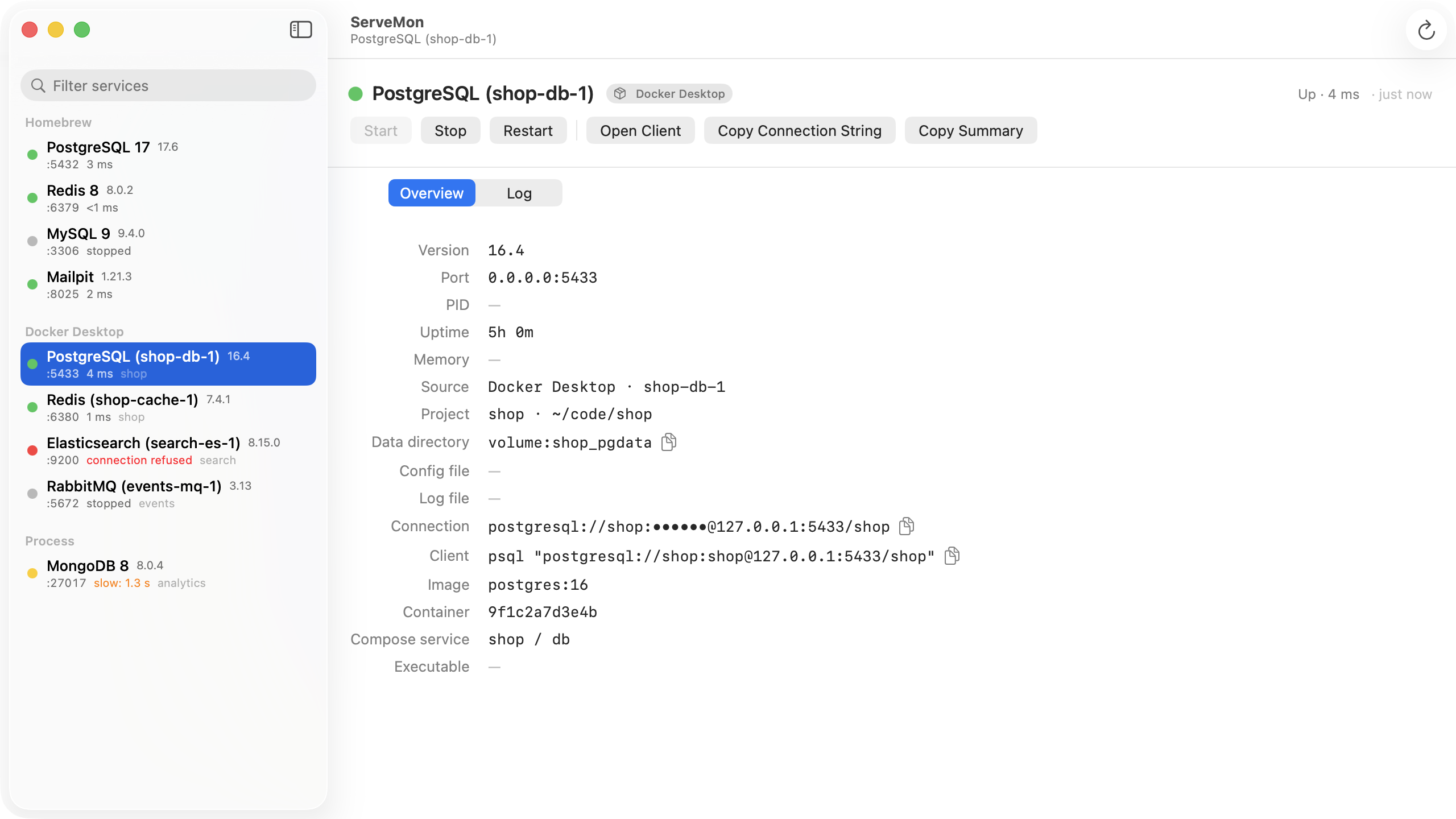
ServeMon shows the data directory, config file, and log file for every Postgres it finds, resolved the same way: from the process arguments, then the environment, then the Homebrew default, then the container mount. Open Data Directory reveals it in Finder; the Log tab tails it.